
PSER Online Registration 2026 is now active across Punjab. Whether you want to apply for the first time, check your CNIC status, register for the Ramzan Package, or understand which welfare programmes you qualify for — this is the most complete guide to the Punjab Socio-Economic Registry available online.
- Check your PSER registration status instantly using your 13-digit CNIC
- Apply for PSER Online Registration at the official portal: pser.punjab.gov.pk
- Find out if you qualify for the Ramzan Package, 12000 income support, Solar Panel scheme, or Negahban ration
- Step-by-step application guide with all 8 form sections explained in detail
- Available for Punjab, Sindh, and KPK residents — completely free
PSER Registration Check — Enter Your CNIC
Check your PSER registration status or get started with a new application
🔒 Your information is not stored. This tool guides you to the official PSER portal.
Online registrations for the PSER survey have now been closed. The PSER survey is currently being conducted door-to-door. If your PSER survey has not been completed, please:
- Visit your nearest PSER Registration Centre
- Or wait for the survey team to visit your area
- For more information, call the official helpline: 0800-02345 (free)
PSER سروے کی آن لائن رجسٹریشن اب بند ہو چکی ہے۔ PSER سروے اب گھر گھر (ڈور ٹو ڈور) کیا جا رہا ہے۔ اگر آپ کا PSER سروے نہیں ہوا تو اپنے قریبی PSER سینٹر تشریف لے جائیں اور اپنا سروے مکمل کروائیں۔ مزید معلومات کے لیے آفیشل ہیلپ لائن 0800-02345 پر کال بھی کر سکتے ہیں۔
What is PSER Online Registration? Complete Guide 2026
PSER stands for Punjab Socio-Economic Registry — a province-wide prosperity survey launched by the Government of Punjab under CM Maryam Nawaz to build a trusted household database of families living across Pakistan.
The registry was created so the government can identify genuinely deserving households and deliver welfare support in a fair, transparent, and data-driven way.
Unlike older welfare systems that relied on scattered lists and recommendations, PSER works differently. It records your family’s actual socio-economic details — income sources, number of family members, housing conditions, assets owned, and other living conditions — and uses this data to calculate an eligibility score for each household.
The Punjab Social Protection Authority (PSPA) manages this database and uses it to decide which families qualify for different government assistance programmes.
PSER Online Registration means entering your household’s information into this government database through the official portal at pser.punjab.gov.pk. Once registered and verified, your household is assessed and given a PMT (Proxy Means Test) score.
The lower your score, the higher your priority for programmes like the Ramzan Package, Negahban Ration, 12000 income support, Solar Panel Scheme, Bewa Sahara Card, and every future welfare programme the Punjab government announces.
PSER Survey 2026 — Key Facts at a Glance
| Attribute | Details |
|---|---|
| Programme / Survey Name | PSER (Punjab Socio-Economic Registry) Survey |
| Start Date | 23 April 2025 (relaunched 2026) |
| Launched By | CM Maryam Nawaz, Government of Punjab |
| Coverage Area | Punjab Province — all 36 districts |
| Support Programmes Linked | 10+ welfare and relief schemes |
| Official Helpline | 0800-02345 (free call, all networks) |
| SMS Status Check | Send CNIC to 8171 or 9999 |
| Registration Centres | 5,000+ across Punjab |
| Official Portal | pser.punjab.gov.pk |
Main Goals of the Punjab Socio-Economic Registry (PSER)
PSER is not just a registration form or a government website. It is a long-term, permanent system designed to change how welfare reaches deserving families in Punjab.
The Punjab government built PSER because older welfare systems were fragmented — different programmes had different lists, families had to re-register repeatedly, and many genuinely deserving households were missed entirely. PSER solves all of this by creating one single, verified database.
Build one reliable database of all households — Instead of maintaining scattered lists for each programme separately, PSER collects and maintains updated household data in one centralised place. Every welfare programme draws from the same source.
Support evidence-based policy and planning — The government can now plan welfare programmes based on real household data and actual needs — not estimates, recommendations, or political lists.
Improve targeting and fairness — When programmes use verified household information, support reaches the right families. It reduces the chance of ineligible households receiving aid while deserving ones are left out.
Reduce duplication and misuse — A central registry prevents the same household from appearing under multiple names or registering in multiple programmes fraudulently. Ghost entries and wrong claims become much harder.
Strengthen social protection delivery — The Punjab Social Protection Authority (PSPA) describes PSER as a targeted social protection system. It makes government welfare faster, more efficient, and fairer across all 36 districts of Punjab.
Objectives of the PSER Programme
Beyond the broad goals, PSER has specific practical outcomes it is designed to achieve:
- Identify low-income and vulnerable households using real, field-verified data rather than assumptions
- Make welfare distribution transparent — every household in the database has a clear eligibility score with no room for favouritism
- Help government programmes reach both urban and rural families — including remote areas covered by the door-to-door survey
- Support better governance and planning — updated socio-economic data helps the government allocate schools, hospitals, and infrastructure where they are most needed
Key Features of the Provincial Socio-Economic Registry (PSER) Programme
Several features make PSER fundamentally different from the registration drives and welfare schemes that came before it:
- One-time registration, many benefits — You register once and your household becomes eligible to be assessed for every linked welfare programme. No need to register separately for each scheme.
- Online and offline access — Register at pser.punjab.gov.pk from your phone or computer, or visit one of 5,000+ registration centres if you do not have internet access.
- Province-wide coverage across all 36 districts — PSER covers every district of Punjab, from Lahore and Rawalpindi to remote rural areas in South Punjab and Pothohar.
- Data accuracy is the foundation — Wrong information — a misspelt name, an incorrect CNIC, or missing family members — can delay or reject your application.
- Helpline support is available — PSER Official Punjab helpline 0800-02345 is available for registration queries, complaints, and status checks. Free from all mobile networks.
- Regular updates and new programmes — As the government announces new welfare schemes, PSER-registered households are automatically considered.
List of Assistance Programmes Available Through PSER
PSER is a registry — not a direct payment system. Your PSER registration becomes a verified base record that every government welfare programme checks against when selecting beneficiaries. The more accurate and complete your household data, the higher your chance of being selected when a programme is announced.
Registered households can become eligible to apply for programmes including:
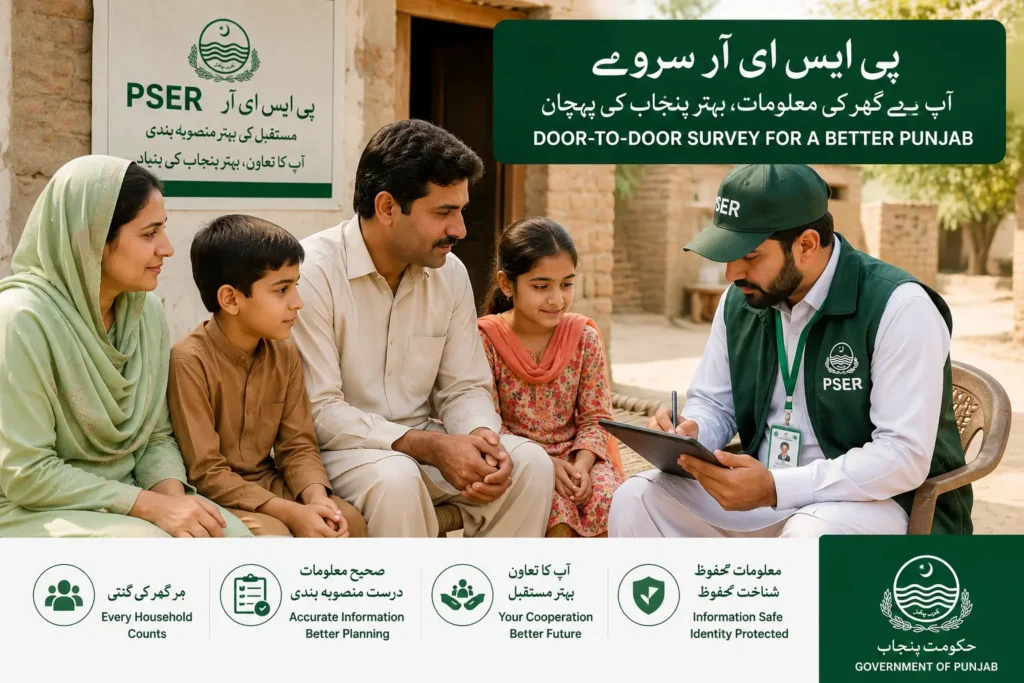
- Ramzan Package — Seasonal cash or ration support during Ramzan for PSER-registered households
- PSER 12000 Income Support — Monthly Rs.12,000 financial assistance for the most deserving registered households
- Negahban Ration Programme — Subsidised or free ration distribution for low-income families across Punjab
- Bewa Sahara Card — Financial support specifically for widows registered in the PSER database
- Solar Panel Scheme — Free solar panels for deserving PSER-registered households under CM Maryam Nawaz’s initiative
- Kisan Card — Agricultural support for farming households registered in PSER
- Ilimmat Card — Education support, including student stipends for children in registered households
- Ba-Ilimmat Buzurg Support — Financial assistance for senior citizens in PSER-registered families
- Health Support Schemes — Health coverage initiatives for registered households, linked to Punjab health programmes
- Mother and Child Support — Aaghosh-type support programmes for pregnant women and children in registered families
- Housing Support Initiatives — Apni Chhat Apna Ghar-type programmes for homeless or inadequately housed registered families
- Masawaat Programme — Social protection and livelihood support for the most vulnerable registered households
- Emergency and Flood Relief — When natural disasters hit, PSER-registered households are prioritised for emergency assistance
PSER Door-to-Door Survey 2026
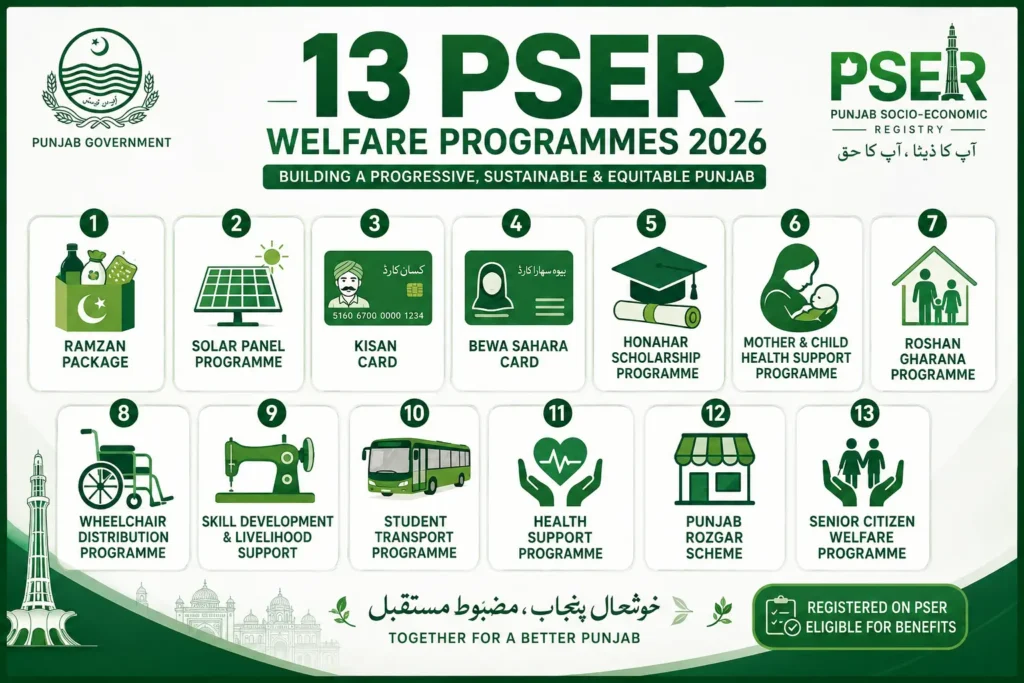
The PSER door-to-door survey is the field verification phase of Punjab’s Socio-Economic Registry. Instead of relying solely on online submissions, the Punjab government deploys trained survey teams that physically visit homes across all 36 districts to collect and verify real household information — income, family members, housing conditions, and living standards.
This ensures that families who cannot access the internet or have difficulty filling out online forms are still included in the registry.
When a survey team visits your home, they record your household details directly — cross-checking what you submitted online (if you already registered) or collecting fresh data if your household has not yet been registered.
This information is then entered into the PSER database and used by the government to assess your eligibility for welfare programmes. The door-to-door visit is not a separate process from online registration — it is part of the same PSER system.
Missed the Survey Team? If a survey team has already visited your area but missed your household, register directly at pser.punjab.gov.pk or visit your nearest PSER Registration Centre. Call 0800-02345 to find your nearest centre.
PSER Eligibility Requirements for Punjab Residents (Detailed)
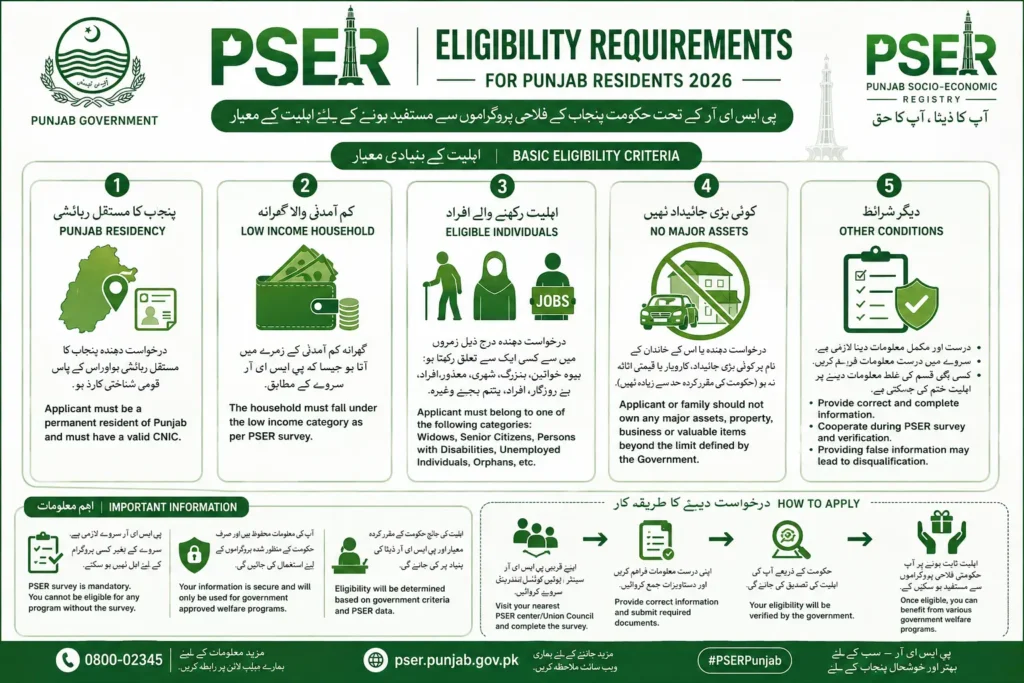
The Punjab Socio-Economic Registry is open to all families living in Punjab — anyone can submit their household details. However, eligibility for PSER-linked programmes depends on your household’s eligibility score (PMT score), which is calculated after your information is reviewed and verified. Families facing genuine financial hardship are given the highest priority.
To be considered a deserving household in the PSER Survey, your situation should match most of these points:
- You must live in Punjab — Punjab residency is required for most PSER-linked programmes. KPK and Sindh residents can register for federal-linked schemes through the same portal.
- Your household should be genuinely needy — the PSER system is designed for financially weak and deserving families. If your household manages comfortably, your eligibility score will be lower.
- Your monthly income is too low to cover basic expenses — Food, bills, rent, medicines, school fees — if your household struggles with these, you are likely eligible.
- Your family falls under low-income or poverty-level conditions — based on the PSER PMT scoring model, households at or below the poverty line receive top priority.
- A family member has a disability or a serious long-term health condition — This significantly increases your household’s eligibility score.
- You are a widow, senior citizen, or unemployed person — or your household depends primarily on such members for survival.
- You are not already receiving adequate support from another major government programme — If your household already receives significant assistance, your priority score will be adjusted.
- You provide complete and truthful household information — Providing false or incomplete information causes rejection or delays. Field verification teams check submitted data against real conditions.
Final selection for any programme is made after official field verification of your submitted data and a formal assessment of your PMT score (Proxy Means Test score) by the concerned authorities. The process is designed to be objective and data-driven.
PSER Login — Access Your Account
Once you have created your PSER account during registration, your login credentials — your CNIC number and password — give you access to the full PSER portal where you can: fill and submit your household survey application, track your application status, update your household information if anything changes, and view which programmes your household has been considered for.
The official login page is part of the PSER portal at pser.punjab.gov.pk. After creating your account with your CNIC, mobile number, and email, you log back in using those same credentials to complete and submit the full household survey form.
Note that the PSER system may have different login sub-sections depending on whether you are accessing the general registration portal or a specific programme portal — always use the official Punjab government domain.
Forgot Your Password? Use the ‘Forgot Password’ option on the PSER portal login page. Enter your registered CNIC and mobile number to receive an OTP for password reset. If your mobile number has changed, call 0800-02345 for manual account recovery.
How to Register for PSER Online in 2026
PSER online registration is designed to be straightforward. The Punjab government has set up the process so that even first-time internet users can complete it from a basic smartphone.
You can register directly at pser.punjab.gov.pk or visit one of the 5,000+ registration centres across Punjab if you need in-person help.
What You Should Keep Ready Before You Start
- CNIC of the family head — 13-digit, active, and not expired
- Active mobile number connected to your CNIC — Your SIM must be Nadra-biometric verified. Check by dialling *789# before starting. If not verified, your OTP will not arrive.
- Basic family information — Full names, ages, and CNIC or B-Form numbers of all family members
- Address details — Your complete home address, including street, mohalla, tehsil, and district
Basic Online Registration Steps (Account Creation)
- Go to the official PSER portal at pser.punjab.gov.pk
- Click New Registration on the portal homepage
- Enter your name, CNIC, mobile network, mobile number, and email (if asked)
- Create a strong password you will remember — you will need it to log back in and complete the survey
- Verify the OTP sent to your registered mobile number
If you cannot complete registration online, the Punjab Portal points to registration centres across all 36 districts of Punjab where trained staff will help you register in person at no cost.
How to Apply For the PSER Programme?
Many people confuse PSER registration with PSER application. They are two separate steps, and both are necessary:
| Step | What It Means |
|---|---|
| Registration | Creating your PSER account — name, CNIC, mobile number, password |
| Application / Survey Submission | Completing the full household record with all your details — this determines your eligibility score |
After creating your account, log back in to the PSER portal and open the New Application or survey submission section. This is where you enter the detailed household information that determines your eligibility score.
PSER Punjab Application Submission Process — All 8 Steps Explained
The full PSER household survey has 8 sections. Each section must be completed carefully and honestly. Here is what each step covers and what mistakes to avoid:
Step 1: Log In to PSER Portal
- Visit pser.punjab.gov.pk and log in with your CNIC and password
- Select New Application (or the equivalent option shown on your dashboard)
- Read all on-screen instructions carefully before filling in any fields
Step 2: Family Head Information
- Enter the family head’s full name exactly as it appears on their CNIC
- Double-check every digit of the 13-digit CNIC number — one wrong digit means the application cannot be verified
- Use the mobile number that is registered against your CNIC — this is where confirmation messages are sent
Step 3: Family Roster Details
This is where most applicants make costly mistakes. Every single family member living in your household must be added — missing even one person can affect your eligibility score and may cause issues during field verification.
- Full name, gender, and date of birth of each family member
- CNIC number (adults) or B-Form number (children under 18)
- Current education level of each member
- Employment status and income source — even if income is zero, enter zero. Do not leave blank.
- Any disability or serious long-term health condition
Step 4: Contact & Address Information
Enter your complete home address clearly and accurately. This is the address where the door-to-door verification team will visit.
An incorrect address means the team cannot find your home, which can delay or cancel your verification. Include your street name, mohalla, tehsil, and district. Select rural or urban correctly if the form gives you that option.
Step 5: Asset & Housing Information
This section helps the PSER system calculate your household’s living standard score. Be honest — field verification teams will check your housing conditions during their visit:
- Whether you own your home or rent it
- Type of housing structure (pucca, semi-pucca, or kacha)
- Utilities available at home (electricity, gas, clean water)
- Any vehicles or major assets your household owns
Step 6: Agriculture Information (If Applicable)
Only fill this section if your household is involved in farming or owns agricultural land:
- Whether you own agricultural land and how much (in acres or marlas)
- Type of farming — subsistence or commercial
- Basic farming income, if applicable
Step 7: Miscellaneous Information
This section captures additional factors that affect your household’s vulnerability and eligibility score:
- Are you receiving help from any other government programme? (If yes, which one)
- Does your household have access to the internet or a smartphone?
- Has your household been affected by a major emergency, flood, or natural disaster?
Step 8: Review & Submit
Before you click submit, spend 5 minutes reviewing every section. This single step can be the difference between approval and rejection:
- Recheck every CNIC number digit by digit — one wrong number means your application cannot be verified
- Confirm all family members’ names match their CNIC or B-Form exactly
- Make sure no family member has been left out of the roster
- Check that your address is complete and locatable
- Confirm all income fields are filled — enter 0 if income is zero. Do not leave blank.
Why Review Matters: Small mistakes cause delays or rejection — especially a wrong CNIC digit or a missing family member. Once submitted, changes may be difficult to make without contacting the helpline. Take 5 extra minutes to review before submitting.
How to Check PSER Application Status Online?
After submitting your PSER application, you can track your status at any time using four methods. Your status will show as one of these: Registered, Under Review, Approved, or Not Found.
- Via PSER Portal — Log in to your account at pser.punjab.gov.pk, go to your dashboard, and check the status shown in your application section
- Via SMS to 8171 — Open your SMS app, type your 13-digit CNIC (no dashes), and send it to 8171 from any mobile network. You will receive an instant reply with your status.
- Via SMS to 9999 — Send your 13-digit CNIC to 9999 for PSER-specific programme status and eligibility information
- Via Helpline — Call 0800-02345 (free from all networks) to speak to a PSER representative who can check your status manually
Status Shows ‘Not Found’?If your status shows ‘Not Found’, your household is not yet in the PSER database. Complete a new registration at pser.punjab.gov.pk. If you submitted your application but still see ‘Not Found’ after 7 working days, contact the helpline — your application may be under manual review.
PSER Online Registration 2026 Last Date
“PSER last date” is one of the most searched terms related to this programme. But here is what you need to understand about how PSER deadlines actually work: PSER is not a one-time scheme with a single deadline.
It is a permanent household registry — a database the government maintains and updates continuously. Deadlines appear when the government runs a specific programme drive or links a welfare scheme to PSER registration.
- No fixed final deadline has been announced for PSER registration itself as of 2026
- If a deadline is announced for a specific programme (like the Ramzan Package), it applies only to that programme — not to PSER registration overall
- Deadlines can change based on government decisions — always verify from official sources before acting on any date you read online
Registration Deadline (Last Date) — 2026 Update
Always use official sources to confirm whether registration is currently open and whether any deadline applies:
- Official PSER Portal — pser.punjab.gov.pk (check the homepage for active notices or deadline announcements)
- Official Helpline — Call 0800-02345 for the most current and accurate deadline information
How to Check/Register (When Open)
- Online: Use the PSER portal at pser.punjab.gov.pk and complete your registration directly from your phone
- Registration Centres: The Punjab Portal mentions thousands of centres where staff can help you register in person
- Helpline Number Support: If confused about the last date or your registration, call 0800-02345 (free)
Conclusion
The PSER Survey (Punjab Socio-Economic Registry) is one of the most important steps the Punjab government has taken toward fair, transparent, and data-driven welfare delivery. By building a single verified database of all households in Punjab, PSER ensures that deserving families are found, registered, and reached — regardless of where they live.
If your household has not yet registered, do not wait. Visit pser.punjab.gov.pk today, complete your registration and full survey submission, and make sure your family is in the database.
Every welfare programme the Punjab government announces — the Ramzan Package, income support, ration distribution, solar panels, widow support, and more — draws its beneficiary list from the PSER database. Without registration, your household will not be considered, regardless of how deserving it is.
Register Today — It’s Free. Visit pser.punjab.gov.pk to register your household now. For help, call the free helpline 0800-02345 or visit your nearest PSER Registration Centre. Registration takes less than 20 minutes.
FAQs — PSER Online Registration 2026
Q: What is the PSER survey?
PSER stands for Punjab Socio-Economic Registry. It is a province-wide household survey launched by the Government of Punjab under CM Maryam Nawaz to build a trusted database of families across Punjab. The government uses this database to identify deserving households and deliver welfare programmes, including the Ramzan Package, 12000 income support, Negahban ration, Solar Panel scheme, and more.
Q: Why should I complete the PSER survey?
Without being in the PSER database, your household will not be considered for any Punjab government welfare programme — even if you are genuinely deserving. Every welfare scheme the Punjab government announces draws its beneficiary list directly from the PSER database. Registration is completely free and takes less than 20 minutes.
Q: How can I register for the PSER survey?
Visit pser.punjab.gov.pk, click New Registration, enter your CNIC and Nadra-verified mobile number, complete the household survey form with all 8 sections, and submit. For in-person help, visit your nearest PSER Registration Centre or call 0800-02345.
Q: Is PSER registration compulsory?
PSER registration is not legally compulsory. However, it is practically essential — without it, your household will not be eligible for any Punjab government welfare programme. Think of it as mandatory if you want access to any government assistance.
Q: What details are required for PSER?
You need: the family head’s 13-digit CNIC, a Nadra-biometric verified mobile number (check via *789#), full names and CNIC or B-Form numbers of all family members, household income details (enter zero if no income), housing and asset information, and your complete home address including district and tehsil.
Q: Who should be the ‘family head’ in the PSER form?
The family head should be the main earning member or the oldest responsible adult in the household — typically the father or the mother if she is a widow. The family head’s CNIC is used to create the PSER account, and all official communications are sent to their registered mobile number.
Q: I didn’t receive my OTP — what should I do?
First, check that your SIM is Nadra-biometric verified by dialling *789#. If not verified, get it verified at any mobile operator service centre. If your SIM is verified, wait 3–5 minutes and retry. Make sure your phone is not in DND mode. If still not receiving OTP, call the helpline 0800-02345.
Q: I forgot my PSER password — how can I recover it?
On the PSER portal login page at pser.punjab.gov.pk, click ‘Forgot Password’. Enter your registered CNIC and mobile number. An OTP will be sent to that number to reset your password. If your mobile number has changed, call 0800-02345 for manual account recovery.
Q: Can I edit my PSER application after submission?
Whether you can edit after submission depends on the current portal settings. Log in to your PSER account and check if an edit option is visible on your application. If no edit option appears, contact helpline 0800-02345 or visit your nearest PSER Registration Centre.
Q: How do I check my PSER application status online?
Three methods:
- (1) Log in to pser.punjab.gov.pk and check your application dashboard.
- (2) Send your 13-digit CNIC to 8171 via SMS for an instant status reply.
- (3) Send your CNIC to 9999 for PSER-specific programme status.
If status shows ‘Not Found’ after 7 working days, contact helpline 0800-02345.
Q: What is ‘door-to-door verification’?
After you submit your PSER application online, a government field survey team may visit your home to verify the information you provided — housing conditions, family members, income, and asset details. This verification determines your final eligibility score. Be honest in your application — the field team’s findings override your submission if there is a significant mismatch.
Q: What is a PMT score and why does it matter?
PMT stands for Proxy Means Test. It is the eligibility score the PSER system calculates for your household based on all the information you submitted — income, assets, housing quality, family size, disability status, and other factors. A lower PMT score means a higher poverty level, which means your household gets higher priority for welfare programmes.
Q: Is there a PSER helpline?
Yes. The official PSER helpline number is 0800-02345. It is completely free from all mobile networks, including Jazz, Telenor, Zong, and Ufone. The helpline handles PSER registration queries, status checks, complaints about rejection, and help finding your nearest registration centre. You can also send your CNIC to 8171 or 9999 via SMS for quick automated status checks.